

Top 10 Grammarly Alternatives: Best Free & Paid Writing Tools
Finding the right writing assistant can transform your content creation process. While Grammarly has dominated the market for years, numerous powerful alternatives now offer competitive features, better pricing, and unique capabilities that might better suit your specific needs.
Whether you’re searching for a Grammarly free alternative or a premium tool with advanced AI features, understanding your options is crucial. This comprehensive guide explores the best Grammarly alternatives available in 2026, helping you make an informed decision based on your writing goals, budget, and specific requirements. Bloggers should also see the Best WordPress alternatives.
The landscape of writing assistance tools has evolved significantly. Modern alternatives offer everything from basic grammar checking to sophisticated AI-powered content generation, plagiarism detection, and style enhancement. Many alternatives for Grammarly now provide features that rival or exceed the original, often at more competitive price points.
Why People Search for Grammarly Alternatives
Users seek Grammarly alternatives for several compelling reasons. Understanding these motivations can help you identify which features matter most for your writing workflow.
Common Limitations of Grammarly
Despite its popularity, Grammarly has limitations that drive users to explore alternatives:
- Price concerns: Grammarly Premium costs $30 per month or $144 annually, which can be steep for individual users and small businesses
- Limited free version: The free tier offers basic grammar checking but lacks advanced features like tone detection, plagiarism checking, and style suggestions
- Privacy concerns: As a cloud-based service, all your writing passes through Grammarly’s servers, raising data security questions for sensitive documents
- Limited multilingual support: While improving, Grammarly primarily focuses on English, offering limited support for other languages
- Occasional false positives: The AI sometimes flags correct usage as errors, requiring manual verification
- Generic writing style: Suggestions can sometimes make writing sound overly formal or homogenized
Who Should Consider an Alternative to Grammarly?
Certain user groups benefit significantly from exploring a Grammarly alternative:
- Budget-conscious writers seeking free or more affordable options
- Non-English writers requiring robust multilingual support
- Academic writers need specialized citation and research tools
- Business professionals requiring brand voice consistency tools
- Privacy-focused users who prefer offline or locally-hosted solutions
- Writers seeking specialized features like advanced paraphrasing or SEO optimization
What to Look for in the Best Grammarly Alternative
When evaluating alternatives for Grammarly, consider these essential features to ensure you choose the right tool for your needs.
Grammar and Spell Check Accuracy
The foundation of any writing assistant is accurate grammar and spelling correction. The best Grammarly alternative should catch:
- Subject-verb agreement errors
- Punctuation mistakes and comma splices
- Contextual spelling errors (e.g., their vs. there)
- Tense consistency issues
- Pronoun reference problems
AI Writing Assistance and Rewriting Tools
Modern writing assistants go beyond basic corrections. Look for AI-powered features that help you:
- Rephrase sentences for better clarity and flow
- Generate content suggestions and completions
- Expand or condense text while maintaining meaning
- Provide alternative word choices and synonyms
Tone Detection and Clarity Suggestions
Effective communication requires the right tone. Quality alternatives should analyze your writing’s emotional impact and suggest adjustments to match your intended audience and purpose. This includes detecting whether your writing sounds professional, casual, confident, or uncertain.
Plagiarism Checker Capabilities
For academic and professional writers, plagiarism detection is non-negotiable. The best tools scan billions of web pages and academic databases to ensure your content is original. Some Grammarly free alternatives offer limited plagiarism checks, while premium versions provide comprehensive scanning.
Multilingual Support
If you write in multiple languages, seek alternatives that support your language combinations. Tools like LanguageTool support 30+ languages with grammar checking, making them ideal for multilingual writers and international teams.
Pricing and Free Plan Availability
Budget considerations are crucial. Compare:
- Free tier capabilities and limitations
- Monthly versus annual subscription costs
- One-time purchase options
- Team or enterprise pricing
- Student or academic discounts
Browser Extensions and App Integrations
Seamless integration enhances productivity. Prioritize tools offering:
- Chrome, Firefox, Safari, and Edge browser extensions
- Microsoft Word and Google Docs add-ons
- Email client compatibility (Gmail, Outlook)
- Desktop applications for offline use
- Mobile apps for iOS and Android
Free Grammarly Alternatives (Best Budget Options)
Several excellent grammarly free alternative options provide substantial value without subscription fees.
Tools with Strong Free Grammar Checking
These free tools offer robust grammar checking capabilities:
- LanguageTool: Offers comprehensive free grammar checking with browser extensions and supports multiple languages
- Hemingway Editor: Provides free readability analysis and simplification suggestions
- Slick Write: Features free grammar, style, and structure checking with no registration required
- QuillBot: Includes limited free grammar checking alongside paraphrasing tools
AI Writing Tools with Free Plans
These platforms combine free grammar checking with AI writing assistance:
- QuillBot: Free plan includes paraphrasing, summarizing, and basic grammar checking
- Wordtune: Offers free sentence rewrites with daily limits
- LanguageTool: Free tier supports 10,000 characters per check with basic AI suggestions
Limitations of Free Grammarly Alternatives
Free alternatives typically have constraints:
- Character or word count limits per check
- Restricted access to advanced features like plagiarism detection
- Limited AI writing assistance and rewriting capabilities
- Fewer integration options
- Slower processing speeds
- Advertisement displays
Best Grammarly Alternatives in 2026 (Detailed Comparison)
Let’s explore the top Grammarly alternatives available in 2026, each offering unique strengths for different writing needs.
ProWritingAid — Deep Writing Analysis & Style Improvement
ProWritingAid stands out as a comprehensive grammar alternative for writers who want in-depth analysis and style improvement. This tool goes beyond basic grammar checking to provide detailed reports on writing style, readability, overused words, clichés, and sentence structure.
Key Features:
- 20+ detailed writing reports covering style, grammar, readability, and consistency
- Integration with Scrivener, Word, Google Docs, and all major writing platforms
- Plagiarism checker with 50 checks annually on premium plans
- Thesaurus and contextual word suggestions
- One-time lifetime purchase option available
Best For:
Authors, novelists, academic writers, and anyone seeking comprehensive style analysis.
Pricing:
Free limited version; Premium at $10/month (annual) or $399 lifetime license.

Hemingway Editor — Simplifies and Improves Readability
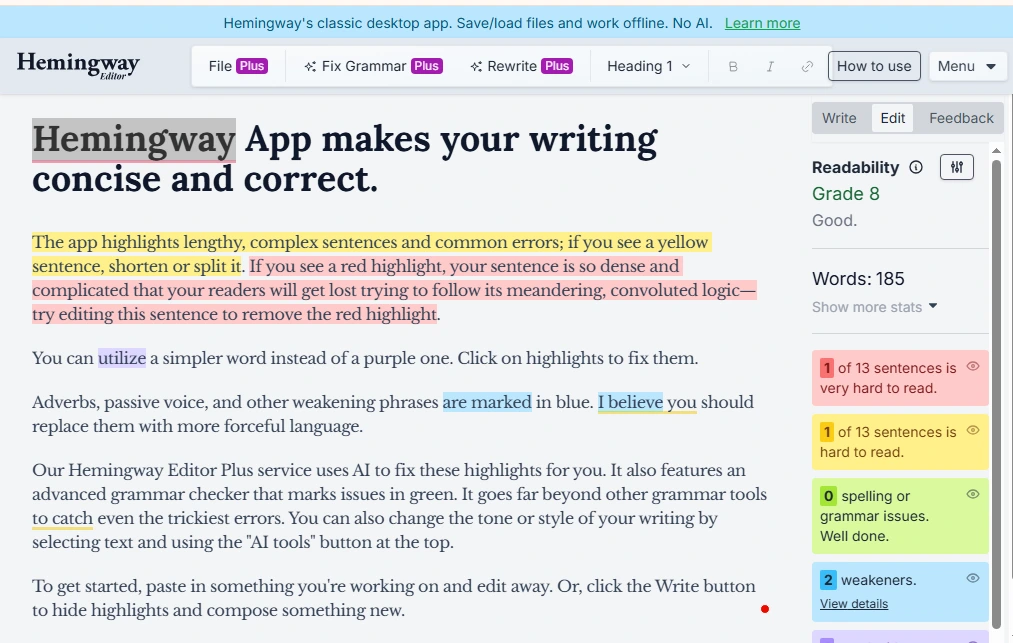
Hemingway Editor focuses on making your writing clear and concise. Named after Ernest Hemingway’s bold, straightforward style, this tool highlights complex sentences, passive voice, and difficult-to-read phrases.
Key Features:
- Color-coded highlighting for sentence complexity and readability issues
- Readability grade level assessment
- Passive voice and adverb detection
- Free web version with full editing capabilities
- Desktop app for offline use
Best For:
Bloggers, content marketers, and writers aim for clear, direct prose.
Pricing:
Free web version; Desktop app $19.99 one-time purchase.
QuillBot – AI Paraphrasing Plus Grammar Checking
QuillBot excels as a Grammarly alternative when paraphrasing and content rewriting are priorities. Its AI-powered paraphraser helps rework sentences while maintaining original meaning, making it invaluable for academic writing and content creation.
Key Features:
- AI paraphrasing with multiple tone and style modes
- Grammar checker with error explanations
- Summarizer tool for condensing long texts
- Citation generator for multiple formats
- Chrome extension and Microsoft Word add-in
Best For:
Students, researchers, and content creators who frequently rewrite and paraphrase.
Pricing:
Free plan with limitations; Premium at $8.33/month (annual).

LanguageTool — Multilingual Grammar and Style Checker
LanguageTool is the premier alternative to Grammarly for multilingual writers. Supporting 30+ languages with native grammar checking, it’s ideal for international teams and non-English writers.
Key Features:
- Grammar and style checking in 30+ languages
- Personal dictionary and style preferences
- Browser extensions for all major browsers
- Office add-ins and email integration
- Open-source foundation with privacy-focused options
Best For:
Multilingual writers, international businesses, and privacy-conscious users.
Pricing:
Free plan available; Premium at $4.99/month (annual).
Writer.com — Business-Focused Writing Assistant with Brand Voice Tools
Writer.com specializes in enterprise and business writing, offering brand voice consistency tools that ensure all team communications align with company guidelines.
Key Features:
- Custom brand voice and style guide enforcement
- Team collaboration and approval workflows
- Inclusive language and bias detection
- Custom terminology and glossary management
- API access for custom integrations
Best For:
Marketing teams, content teams, and businesses require brand consistency.
Pricing:
Starts at $18/user/month for teams; custom enterprise pricing.
Ginger Software — Grammar, Punctuation, and Translation Support
Ginger Software combines grammar checking with translation capabilities, making it a versatile grammar alternative for global users.
Key Features:
- Real-time grammar and spelling correction
- Translation support for 40+ languages
- Sentence rephraser with alternative suggestions
- A personal trainer who learns from your mistakes
- Text reader with text-to-speech functionality
Best For:
Non-native English speakers and users needing translation features.
Pricing:
Free limited version; Premium at $13.99/month or $89.88/year.
Slick Write — Free Grammar Checker with Stylistic Feedback
Slick Write is a completely free grammar alternative that requires no registration. It provides grammar checking alongside stylistic analysis and structural feedback.
Key Features:
- 100% free with no registration required
- Grammar, style, and structure analysis
- Prepositional phrase highlighting
- Vocabulary enhancement suggestions
- Statistics on word count, reading time, and sentence length
Best For:
Budget-conscious writers, students, and casual writers.
Pricing:
Completely free.
WhiteSmoke — Grammar, Style, and Plagiarism Checks
WhiteSmoke provides comprehensive writing assistance with grammar checking, style improvement, and plagiarism detection in one package.
Key Features:
- Grammar, punctuation, and spelling corrections
- Style checker with writing enhancement suggestions
- Plagiarism detector scanning billions of sources
- Translation tools for 50+ languages
- Writing templates for common document types
Best For:
Professional writers and businesses need all-in-one writing assistance.
Pricing:
Web plan at $5/month; Premium at $6.66/month (annual); Business at $11.50/month.

Sapling — AI Writing Assistant with Enterprise Features
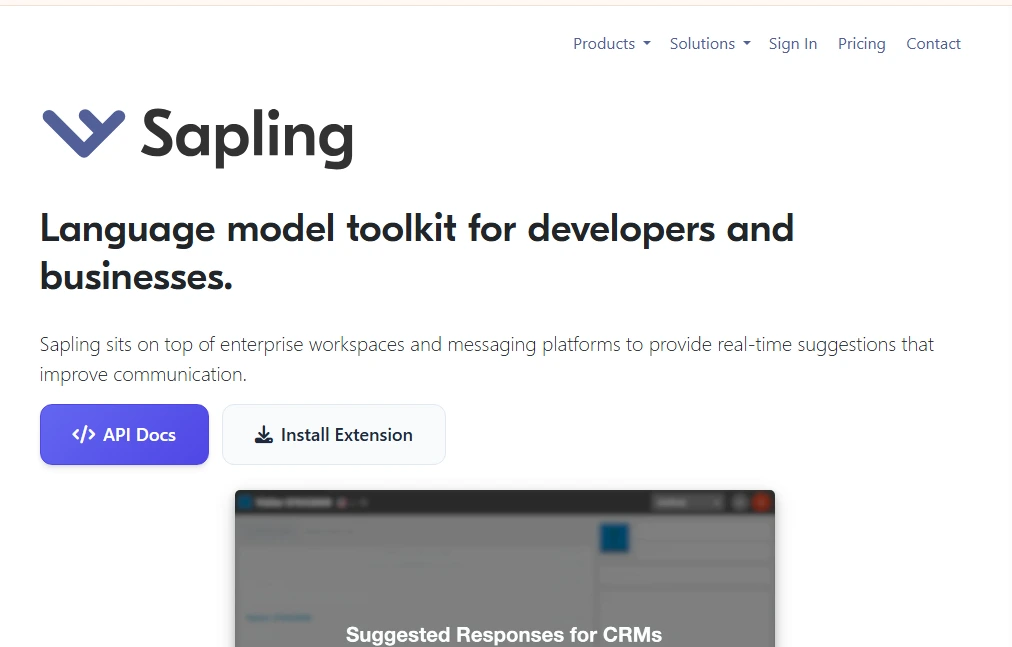
Sapling focuses on customer-facing teams, offering AI writing assistance optimized for support, sales, and success teams.
Key Features:
- Real-time grammar and language quality checking
- Autocomplete suggestions for faster response writing
- Snippet library for common responses
- Team analytics and quality insights
- CRM and helpdesk integrations
Best For:
Customer support teams, sales teams, and enterprise communication.
Pricing:
Free plan available; Pro at $25/user/month; Enterprise custom pricing.
Wordtune — AI Rewriting and Tone Adjustment for Better Clarity
Wordtune specializes in AI-powered sentence rewriting, helping you express ideas more clearly and effectively. It’s an excellent Grammarly alternative for users prioritizing tone and clarity.
Key Features:
- AI-powered sentence rewrites with multiple suggestions
- Tone adjustment (casual to formal)
- Text expansion and shortening
- Browser extension working across platforms
- Spices feature for adding statistics, examples, or counterarguments
Best For:
Writers seeking to improve clarity, professionals refining communication tone.
Pricing:
Free plan with 10 rewrites daily; Premium at $9.99/month (annual).

Grammarly vs Alternatives: Side-by-Side Comparison
Understanding how each Grammarly alternative stacks up helps you make the right choice.
Pricing Comparison
| Tool | Free Plan | Monthly Price | Annual Price | Lifetime Option |
|---|---|---|---|---|
| Grammarly | Basic only | $30 | $144 | No |
| ProWritingAid | Limited | $30 | $120 | $399 |
| Hemingway Editor | Full web | N/A | N/A | $19.99 |
| QuillBot | Limited | $19.95 | $99.95 | No |
| LanguageTool | 10K chars | $24.90 | $59.90 | No |
| Writer.com | No | $18/user | Custom | No |
| Ginger Software | Limited | $13.99 | $89.88 | No |
| Slick Write | Full free | Free | Free | Free |
| WhiteSmoke | No | $5-11.50 | $59.88 | No |
| Sapling | Limited | $25/user | Custom | No |
| Wordtune | 10/day | $9.99 | $119.88 | No |
Key Feature Comparison
| Feature | Grammarly | ProWritingAid | LanguageTool | QuillBot |
|---|---|---|---|---|
| Grammar Check | Excellent | Excellent | Very Good | Good |
| Plagiarism | Premium only | Premium (50/year) | No | Premium only |
| AI Rewriting | Limited | Yes | Limited | Excellent |
| Multilingual | Limited | No | 30+ languages | No |
| Browser Extension | Yes | Yes | Yes | Yes |
| Offline Mode | No | Desktop only | No | No |
| Style Analysis | Good | Excellent | Good | Limited |
| Tone Detection | Premium | Yes | Limited | Yes |
Accuracy in Grammar Correction
When evaluating accuracy, Grammarly and ProWritingAid lead the pack with sophisticated detection algorithms. LanguageTool performs admirably, especially for multilingual content. QuillBot and Wordtune focus more on rewriting than pure grammar checking, making them secondary choices for users prioritizing error detection.
AI Writing and Rewriting Features
For AI-powered rewriting, QuillBot and Wordtune excel. QuillBot offers multiple paraphrasing modes, while Wordtune provides contextual rewrites that maintain your intended meaning. Grammarly’s GrammarlyGO adds generative AI but remains more conservative in suggestions compared to dedicated rewriting tools.
Plagiarism Detection Tools
Grammarly and ProWritingAid both offer comprehensive plagiarism checking, though Grammarly scans more databases. WhiteSmoke provides plagiarism detection across all plans, making it budget-friendly for users requiring this feature. Most free alternatives lack plagiarism checking entirely.
Ease of Use and Interface
Grammarly wins for user interface simplicity and polish. Hemingway Editor offers the most minimalist, distraction-free experience. ProWritingAid presents the steepest learning curve due to its comprehensive reporting features. Most alternatives provide intuitive interfaces suitable for beginners.
Grammarly Alternatives for Different Users
Different writers have different needs. Here’s which alternative for Grammarly works best for specific user types.
Best Grammarly Alternative for Students
QuillBot emerges as the top choice for students. The combination of paraphrasing, grammar checking, citation generation, and summarizing tools addresses core academic writing needs. The free plan offers substantial functionality, while the affordable premium tier ($99.95/year) includes unlimited paraphrasing and advanced grammar checking.
Students benefit from QuillBot’s ability to help rework research findings into original content while maintaining academic integrity. The citation generator supports MLA, APA, Chicago, and other formats, streamlining the bibliography creation process.
Best Grammarly Alternative for Bloggers
Hemingway Editor and ProWritingAid both excel for bloggers, though for different reasons. Hemingway ensures your content remains readable and engaging, highlighting complex sentences that might lose readers. Its readability grades help you match content to your audience’s comprehension level.
ProWritingAid provides deeper style analysis, catching repetitive words, clichés, and vague language that weakens blog posts. The combination of both tools—using Hemingway for readability and ProWritingAid for polish—creates powerful content workflows.
Best Grammarly Alternative for Academic Writing
ProWritingAid leads for academic writing due to its comprehensive analysis and plagiarism checking. Academic writers benefit from detailed reports on consistency, transitions, pacing, and sentence structure—elements crucial for scholarly work.
The lifetime license option ($399) proves cost-effective for graduate students and researchers facing years of writing. ProWritingAid’s integration with Scrivener supports long-form academic projects like dissertations and theses.
Best Grammarly Alternative for Business Professionals
Writer.com specifically targets business and enterprise users. Its brand voice tools ensure all company communications maintain a consistent tone and terminology. Marketing teams appreciate custom style guides that automatically flag off-brand language.
For individual business professionals not requiring team features, Wordtune offers excellent tone adjustment for emails and presentations. The ability to shift from casual to formal tone helps navigate different business contexts.
Best Grammarly Alternative for Non-Native English Speakers
LanguageTool and Ginger Software cater specifically to non-native speakers. LanguageTool’s support for 30+ languages allows writers to check content in their native language before translating, or verify translated content for accuracy.
Ginger Software’s personal trainer learns from your common mistakes, providing targeted practice to improve weak areas. The translation feature helps verify meaning across languages, while the text-to-speech function aids pronunciation learning.
Grammarly Alternatives with AI Writing Features
AI has transformed writing assistance beyond simple grammar checking. Modern grammarly alternatives leverage artificial intelligence for content generation, rewriting, and enhancement.
AI-Powered Content Generation
Several alternatives offer AI content generation:
- QuillBot: Generates paragraph summaries and synthesizes information
- Wordtune: Creates expansions of brief points with supporting details
- Sapling: Provides autocomplete suggestions for faster writing
- Writer.com: Generates brand-aligned content variations
Paraphrasing and Sentence Rewriting
Paraphrasing stands as the most developed AI feature across alternatives:
QuillBot offers seven paraphrasing modes: Standard, Fluency, Formal, Simple, Creative, Expand, and Shorten. Each mode serves different purposes, from simplifying complex text to expanding brief notes into full sentences.
Wordtune provides contextual rewrites that maintain original intent while improving clarity. It suggests multiple variations per sentence, allowing you to choose the best fit.
ProWritingAid includes sentence structure reports with alternative phrasings, though less sophisticated than dedicated paraphrasing tools.
Tone and Style Adjustments
AI-powered tone detection helps match writing to context:
- Wordtune excels at tone shifting, transforming casual messages to professional emails
- Writer.com enforces brand-specific tone through AI analysis
- LanguageTool detects tone in premium plans, suggesting formality adjustments
- ProWritingAid’s style reports identify tone inconsistencies
SEO Writing Assistance
While most grammar tools don’t focus on SEO, some alternatives integrate SEO-friendly features:
- ProWritingAid’s readability analysis aligns with SEO best practices for user engagement
- Hemingway Editor ensures content readability, a key ranking factor
- Slick Write provides structure analysis helpful for organizing SEO content
Cheapest Grammarly Alternatives (Affordable Picks)
Budget constraints shouldn’t compromise writing quality. Several grammarly free alternative options and low-cost tools deliver excellent value.
Monthly vs Annual Pricing
Annual subscriptions typically offer 30-50% savings:
- LanguageTool: $4.99/month annually vs $24.90 monthly (80% savings)
- QuillBot: $8.33/month annually vs $19.95 monthly (58% savings)
- ProWritingAid: $10/month annually vs $30 monthly (67% savings)
- Wordtune: $9.99/month annually vs. a higher monthly rate
One-Time Payment Writing Tools
Escape subscription fatigue with one-time purchases:
Hemingway Editor Desktop: A $19.99 one-time payment provides lifetime access to the desktop app with offline functionality.
ProWritingAid Lifetime: A $399 lifetime license includes all features and updates. For writers planning long-term use, this pays for itself in about 3.5 years compared to annual subscriptions.
Best Value for Money Options
Considering features per dollar:
- LanguageTool Premium ($59.90/year): Excellent value for multilingual users, offering comprehensive grammar checking across 30+ languages.
- QuillBot Premium ($99.95/year): Best all-around value combining paraphrasing, grammar, summarizing, and citation tools.
- ProWritingAid Annual ($120/year): Exceptional value for in-depth writing analysis, especially for authors and academics.
- Slick Write (Free): Unbeatable value for basic grammar and style checking at zero cost.
Grammarly Alternatives for Chrome and Browser Extensions
Browser extensions enable grammar checking across email, social media, and web applications. Most Grammarly alternatives offer browser support.
Best Browser-Based Grammar Checkers
Top browser extensions include:
- LanguageTool: Chrome, Firefox, Edge, Safari, with comprehensive cross-platform support
- ProWritingAid: Chrome, Firefox, Edge, Safari with document integration
- QuillBot: Chrome extension with paraphrasing and grammar features
- Wordtune: Chrome and Edge extension for rewriting and tone adjustment
- Ginger: Chrome, Safari extensions with translation capabilities
Tools That Work with Google Docs
Google Docs integration varies by tool:
- ProWritingAid: Native Google Docs add-on with full feature access
- LanguageTool: Google Docs add-on supporting all languages
- Ginger: Works via browser extension
- Writer.com: Enterprise Google Docs integration
Desktop vs Web-Based Tools
Consider your workflow when choosing between desktop and web-based solutions:
Desktop Applications:
- Hemingway Editor: Offline desktop app for distraction-free writing
- ProWritingAid: Desktop app integrating with Word and Scrivener
- WhiteSmoke: Desktop application for offline use
Web-Based Advantages:
Always updated, accessible from any device, no installation required. Best for users working across multiple computers.
Desktop Advantages:
Privacy (content stays local), offline access, often faster performance, better for sensitive documents.
How to Choose the Right Grammarly Alternative
Selecting the best alternative for Grammarly requires assessing your specific needs against available features.
Define Your Writing Goals
Start by identifying what matters most:
- Academic writing: Prioritize plagiarism detection, citation support, and consistency checking
- Business communication: Focus on tone adjustment, brand voice, and professional polish
- Creative writing: Seek style analysis, readability tools, and vocabulary enhancement
- Content marketing: Value SEO-friendly readability, engagement metrics, and clarity
- Multilingual content: Requires robust language support and translation features
Check Feature Requirements
Create a feature checklist:
- Must-have features (e.g., plagiarism detection, offline access)
- Nice-to-have features (e.g., tone detection, paraphrasing)
- Integration requirements (Google Docs, Word, email clients)
- Platform needs (browser extension, mobile app, desktop)
- Language support requirements
Compare Free Trials
Test before committing:
- Most tools offer free plans or trials—use them with your actual writing
- Test accuracy by intentionally including errors to see detection rates
- Evaluate false positive rates and unhelpful suggestions
- Check integration smoothness with your workflow
- Assess interface usability and learning curve
Consider Privacy and Data Security
Data security matters for sensitive content:
- Cloud-based tools: Data passes through company servers (most tools)
- Offline tools: Content stays local (Hemingway Desktop, ProWritingAid Desktop)
- Open-source options: LanguageTool offers self-hosted deployment
- Privacy policies: Review data retention and usage terms
- Encryption: Check for data encryption in transit and at rest
How to Switch from Grammarly to Another Tool
Transitioning to a new grammarly alternative requires minimal effort when approached systematically.
Exporting Documents and Data
Grammarly stores documents in your account. Before switching:
- Download all documents from your Grammarly account
- Export personal dictionary additions for transfer to new tool
- Save any custom style preferences or settings you want to replicate
- Note your most-used features for recreation in the new platform
Adjusting to a New Interface
Each tool has unique navigation:
- ProWritingAid: Expect more detailed reports requiring initial learning
- LanguageTool: Similar sidebar interface to Grammarly, easier transition
- QuillBot: Different workflow focusing on paraphrasing, then checking
- Hemingway: Completely different approach with color-coding, not sidebar corrections
Allow 1-2 weeks for adjustment and workflow optimization.
Testing Accuracy Before Fully Switching
Run parallel comparisons:
- Check the same document in both Grammarly and your chosen alternative
- Compare error detection completeness and accuracy
- Evaluate the suggestion quality and relevance
- Keep Grammarly active during the transition period if possible
- Gradually shift work to the new tool as confidence builds
Pros and Cons of Grammarly Alternatives
Understanding both advantages and limitations helps set realistic expectations.
Advantages Over Grammarly
Cost Savings: Most alternatives cost significantly less than Grammarly’s $144 annual fee. LanguageTool ($59.90), QuillBot ($99.95), and ProWritingAid ($120) all undercut Grammarly while offering comparable features.
Specialized Features: Alternatives often excel in specific areas—QuillBot for paraphrasing, LanguageTool for multilingual support, ProWritingAid for deep style analysis, Wordtune for clarity improvements.
Better Free Tiers: Many alternatives offer more generous free plans. Slick Write provides full functionality for free, while LanguageTool’s free tier surpasses Grammarly’s free offering.
Multilingual Support: LanguageTool supports 30+ languages natively, far exceeding Grammarly’s primarily English focus.
One-Time Purchases: ProWritingAid and Hemingway offer lifetime licenses, eliminating ongoing subscription costs.
Privacy Options: Desktop applications and self-hosted options (LanguageTool) provide better data privacy for sensitive documents.
Potential Drawbacks
- Less Polished Interfaces: Grammarly’s interface remains industry-leading in polish and user-friendliness. Some alternatives feel less refined.
- Steeper Learning Curves: Tools like ProWritingAid offer more features but require more time to master.
- Fewer Integrations: Grammarly integrates with more platforms and applications than most alternatives.
- Limited Mobile Apps: Grammarly’s keyboard app provides mobile grammar checking across all apps—few alternatives match this functionality.
- Variable Accuracy: Some free alternatives have lower detection rates for subtle grammatical errors.
When Grammarly May Still Be the Better Choice
Grammarly remains optimal for:
- Users prioritizing the most polished, user-friendly interface
- Heavy mobile users needing consistent cross-device checking
- Those wanting extensive platform integrations out of the box
- Users are comfortable with the premium price for maximum convenience
- Teams are already standardized on Grammarly Business
Common Mistakes When Choosing a Grammarly Alternative
Avoid these pitfalls when selecting an alternative to Grammarly.
Choosing Based Only on Price
The cheapest option isn’t always the best value. A free tool lacking essential features creates inefficiency. Spending $60-100 annually for features you’ll actually use proves more cost-effective than free tools requiring multiple workarounds.
Consider the total cost of ownership, including time spent on manual checks, multiple tool subscriptions to cover gaps, and potential errors from incomplete checking.
Ignoring AI Capabilities
AI writing features significantly boost productivity. Tools like QuillBot and Wordtune save hours on rewrites and edits. If you regularly rework sentences for clarity or vary content for different audiences, AI features justify higher costs through time savings.
Overlooking Plagiarism Detection
Academic writers and content creators need plagiarism checking. Choosing an alternative without this feature may require a separate plagiarism checker subscription, negating cost savings. Ensure your chosen tool includes plagiarism detection if you need it.
Not Testing Before Buying
Always test free versions or trials with your actual writing. Grammar tools vary in what errors they catch. What works for technical documentation may not suit creative writing. Test with representative samples before committing financially.
Final Thoughts: Finding the Best Grammarly Alternative
The ideal Grammarly alternative depends entirely on your writing needs, budget, and workflow preferences. No single tool dominates across all use cases.
Quick Comparison Summary
- Best Overall Alternative: ProWritingAid for comprehensive analysis and a one-time purchase option
- Best for Students: QuillBot for paraphrasing, citations, and affordable premium features
- Best for Multilingual Users: LanguageTool for 30+ language support
- Best for Clarity: Hemingway Editor for readability and simplification
- Best for Business: Writer.com for brand voice consistency and team collaboration
- Best Free Option: LanguageTool free tier or Slick Write for zero-cost, comprehensive checking
- Best Budget Premium: LanguageTool Premium at $59.90/year
- Best AI Rewriting: QuillBot or Wordtune for sentence-level improvements
Best Tool Based on Your Writing Needs
Match your primary need to the optimal tool:
- Deep style analysis → ProWritingAid
- Content rewriting → QuillBot or Wordtune
- Readability improvement → Hemingway Editor
- Multilingual writing → LanguageTool
- Brand consistency → Writer.com
- Budget writing → Slick Write or LanguageTool free
- Translation needs → Ginger Software
- Customer support → Sapling
Long-Term Writing Improvement Strategy
Grammar checkers are tools, not replacements for developing writing skills. Use alternatives strategically:
- Study patterns in flagged errors to learn from mistakes
- Use style reports (ProWritingAid) to identify writing weaknesses
- Practice conscious writing without relying solely on automatic fixes
- Gradually reduce dependence as your skills improve
- Combine tools for comprehensive improvement—readability (Hemingway) + grammar (LanguageTool) + style (ProWritingAid)
The Grammarly alternative market offers exceptional options for every writer. Start by testing free versions of tools matching your primary needs. Most alternatives provide generous trials, allowing risk-free evaluation with your actual writing.
Remember that the best tool is the one you’ll consistently use. A less feature-rich option that integrates seamlessly into your workflow outperforms a powerful tool that sits unused. Prioritize your must-have features, test thoroughly, and choose the alternative that makes writing easier and more effective for your specific situation. Writers can benefit from clipping software.
Whether you’re seeking a grammarly free alternative to minimize costs or a premium tool with specialized capabilities, 2026’s options ensure you’ll find the perfect writing assistant for your needs.


